01 / AIConcept
Give your AI the right context.
A read-only MCP connection for selected logs, so your coding assistant can investigate the events you approve without needing unrestricted server access.
 lognivoGet Lognivo
From the first local file to a correlated timeline. Explore what Lognivo does, how to use it, and the details worth knowing before you connect.
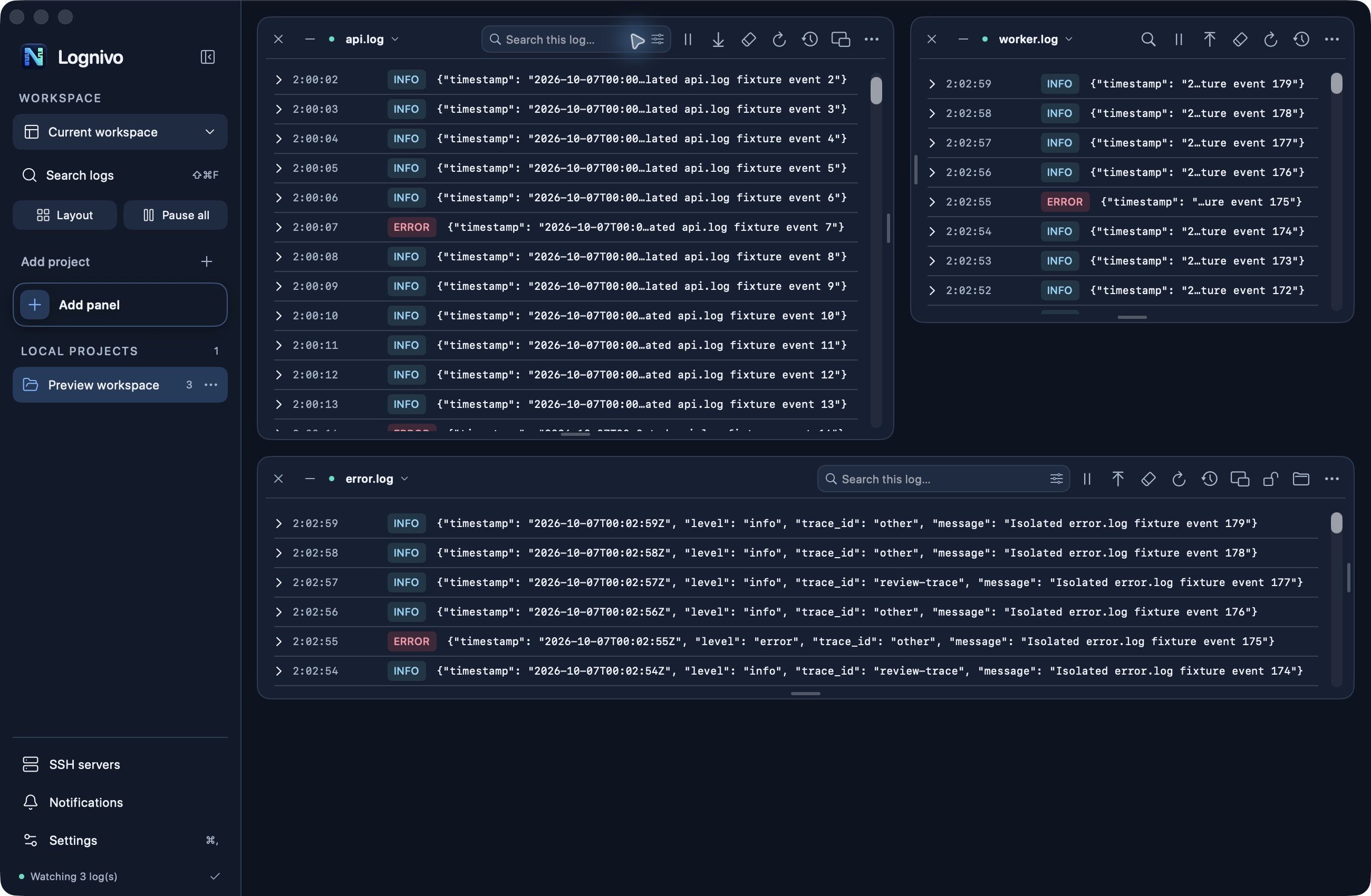
Start with one file or bring a whole project into view. Lognivo reads the logs your application already writes.
No. Open a readable text log or a supported live source. Project recognition helps locate files; it does not require an SDK in your application.
Use Open Log File or add its folder explicitly. Check file permissions and whether the application has actually created a log. Discovery is bounded and does not search every directory on your machine.
The same workspace works across your stack, locally and over SSH. Recognition and log parsing are separate capabilities.
Yes, when they are available as readable text files or supported streams. A language without automatic project recognition can still produce logs Lognivo can display. Binary formats and every vendor-specific record format are not automatically supported.
No Lognivo plugin is required. Read an existing debug.log, PHP error log or server log locally or over SSH. WordPress must be configured to write the log; Lognivo does not enable WP_DEBUG or edit wp-config.php for you.
No. Framework type and Local, Staging or Production are different settings. Review the environment label before running commands.
Bring readable remote logs into ordinary panels, without uploading them to a hosted log service.
File browsing and tailing are read-only. There is no remote Empty File action. The separate Project commands console can run commands that change files or services, after you review their target.
Saving is off by default. You can opt into macOS Keychain storage and explicitly retrieve a saved password. Apple Passwords AutoFill is a separate system feature. Passwords are not stored in profiles or saved views.
Not currently. App-managed connections ignore user ssh_config. Connect directly to a Linux/Unix endpoint with supported authentication and the required shell tools. Reconnecting after a lost session is explicit.
Follow application output even when there is no ordinary log file to open.
The target machine needs Docker, access to its daemon and a logging driver that supports reading logs. Lognivo uses that machine’s current Docker context. It does not install or start Docker for you.
systemd sources require a Linux server reached over SSH and journal permissions for that account. Lognivo does not automatically run sudo or grant permissions.
Catch-up is bounded. Long gaps, expired container logs or events without usable timestamps may limit replay. A stream that ends requires Refresh. Keep server-side retention if complete history matters.
Keep several logs visible and give each one the space and controls it needs.
It fixes its dimensions and keeps it in the locked group before free panels. A locked panel cannot be dragged, resized, minimized or closed until unlocked.
No. Minimized panels keep monitoring. Use the panel’s Pause action or Pause all to stop live reading.
No. Closing removes the panel after confirmation; the source file stays on disk. Empty File on Disk is a separate, explicit action.
Follow new events or stop and read the context around an error.
Panels keep a bounded recent buffer, not a permanent archive. Older entries leave it as limits are reached. Use Search Across Logs for a bounded disk search, or your existing archive for full retention.
No. Global pause preserves each panel’s own setting. Resume catches up within the reader’s history limits.
Clear View clears only the displayed buffer. Empty File on Disk truncates a local file after confirmation, with an extra production confirmation when applicable. Empty File is unavailable for SSH and live streams.
Reduce the noise inside a panel without changing the source log.
No. Text matching is case-insensitive. Pick whole-word or exact-message matching when a simple substring gives too many results.
Use Reset All Filters or Clear filters in an empty filtered panel. Selecting no severity levels means all levels. Clearing filters does not reload unlimited history.
Search beyond the rows currently loaded in your panels, when you need older context.
No. Panel search filters its in-memory buffer. Search Across Logs performs an explicit search of readable log files, including content outside that buffer.
Up to the newest 8 MiB per file, 64 MiB in total and 500 results. The app reports limits. This is not a complete archive index and no background search runs.
Make levels, timestamps and related events easier to read without requiring one logging framework.
Its format may lack a recognized explicit level. Lognivo prioritizes explicit levels; text-based guesses are marked as inferred. Custom field mappings can help with a known JSON or column format.
No. Parsing uses bounded recognition rules. Stack groups are limited to 200 lines or 64 KiB. Missing timestamps stay missing, and timestamps without a timezone use the Mac’s timezone.
Yes. A panel’s format is saved with its workspace and named views. Older saved views default to automatic parsing.
Follow a request across the selected project’s open panels in one chronological view.
No. It combines the selected project’s open panels and their loaded events. Use file search for older file content.
No. Correlation uses IDs already present in supported log fields. Your application needs to write usable identifiers; Lognivo does not add distributed tracing instrumentation.
Share a focused investigation instead of a whole raw log.
The export snapshots the visible timeline rows. Set the time, correlation and panel filters before exporting the part you need.
No. It recognizes common credential keys, Bearer/JWT tokens and URL passwords, but arbitrary personal data and unusual secrets may remain. Review the exported file before sharing it.
Choose the events worth interrupting you for, with rules you control.
No. Rules evaluate open, unpaused feeds while the app is running and the Mac is awake. Minimized panels continue; inactive project readers stop. Use a server monitoring service for always-on alerts.
System notifications omit log messages and rule names. Recent matches inside the app retain context. Matching is throttled per rule and file to reduce repeated interruptions.
The original event may have left the bounded buffer. Lognivo then shows the saved notification preview instead of treating identical text as the same event.
Return to an investigation with its sources, layout and reading choices ready.
No. The working workspace and named views are separate. Use Update current view or Command-S to update the active named view; Command-Shift-S creates a new one.
No. They store setup and references. SSH profiles, notification rules, command presets and app preferences are managed separately. Recent reading buffers are only kept temporarily in memory.
Lognivo retains up to eight inactive project views within a combined 32 MiB budget. An evicted view still has its saved layout but loads bounded history again.
Keep a log beside your editor and reach monitoring controls without reopening the full workspace.
No. It shares the existing feed and controls, with its own viewport. Filter and pause changes affect that same feed.
Yes, while Lognivo remains running and the Mac is awake. Reopen it from the Dock or enable the optional menu-bar icon in Settings. Quitting or sleeping stops monitoring; hiding the icon does not.
Stay focused on your code. Lognivo can keep your open feeds running after you close the main window.
Open the feeds you want to follow and keep Monitoring active enabled. Close the main window without quitting Lognivo. Enable Show Lognivo in the menu bar in Settings if you want quick access to its status and controls.
Lognivo must remain running, your Mac must be awake and the selected source must be reachable. Remote feeds need their SSH connection. Quitting or sleep stops monitoring; resuming catches up within the source’s history limits.
Recent matches retain their file, project, environment and rule context. Show in Log reveals the original event when it is still in the buffer, or shows its saved preview otherwise.
Run an explicit command in the project you are investigating, with its output kept in view.
No. Commands do not run from notification rules or saved-view restoration. The project console reviews the shell text, directory, server and optional container before execution.
Yes. They run with the target account’s permissions. Changing maintenance actions require confirmation, with typed PRODUCTION confirmation for production. Read the command and target before accepting.
The console captures commands it launches; it does not attach to arbitrary existing processes. Use a supported log source for existing services. Stop cancels the monitored process, but independently detached children may keep running.
Keep the source and environment visible before taking an action that changes data.
Yes. CLI configuration and PHP-FPM may differ. Review the selected source path. Reading the CLI PHP setting does not prove the website uses the same file.
Reset View Only preserves projects, log paths, saved views, rules and SSH profiles. Factory Reset removes saved app setup, rules, profiles and app-saved SSH passwords after confirmation. Neither deletes your actual projects or log files.
A native macOS workspace, with log text kept in your own workflow.
Lognivo is a Mac app. It can read supported Linux/Unix sources over SSH, but there is no Windows or Linux desktop edition.
The website and guides are available in English and Swedish. The current Mac app interface uses English.
Five directions we want to explore for Lognivo. Future ideas, not features included in today’s version.
A read-only MCP connection for selected logs, so your coding assistant can investigate the events you approve without needing unrestricted server access.
Group repeated errors, track how often they occur and bring genuinely new patterns to the surface. Spend time on the cause instead of counting duplicates.
Compare two time windows around a release. Spot new error patterns and changes in frequency, with a clear view of before and after.
Package selected events, timeline context and notes for a colleague, with a masking preview before sharing. Make the next handover easier to follow.
Choose several projects to monitor together in the background, with a shared status view and per-project rules. Expand today’s background monitoring of the active workspace.
No delivery dates promised. Scope and priorities may change. Choose Lognivo for the features available today.
Start with a practical guide for your source, or choose a Lognivo plan.