One view.
Every angle.
Arrange local and remote logs side by side. Save your workspace and pick up where you left off.
 lognivo Get Lognivo
 The native Mac workspace for developers who
would rather fix the problem than find the log.
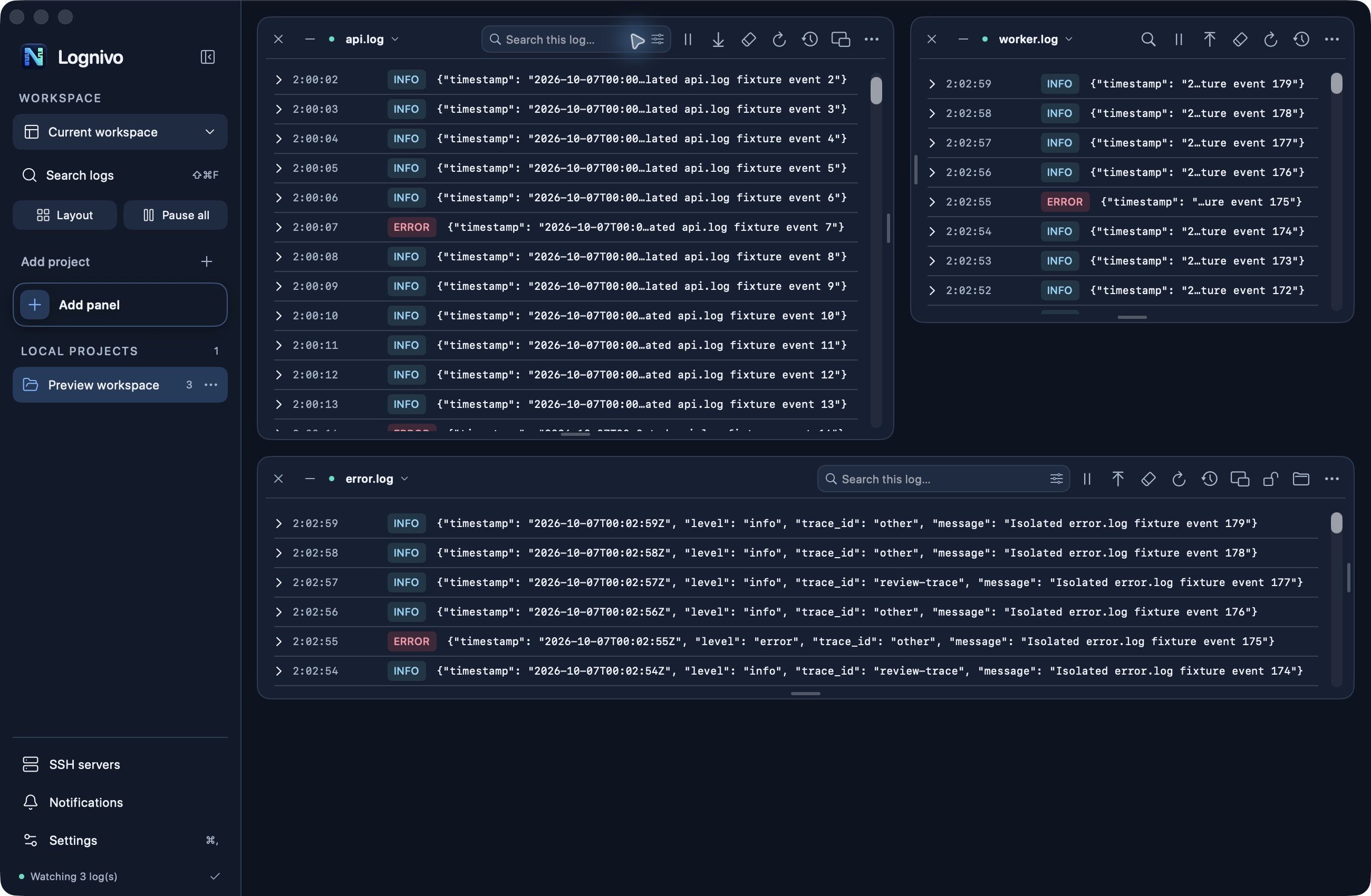
Your app, server and containers tell the same story. Bring their logs together, cut through the noise and keep the context.
Arrange local and remote logs side by side. Save your workspace and pick up where you left off.
Filter by severity, search across logs and expand the full story behind a single line.
Read files, connect over SSH and follow Docker, Compose and systemd logs in the same place.
Keep open logs watching in the background and receive notifications when your rules match, while your Mac is awake.
Combine panels in a timeline. Follow request IDs and export relevant events with masking.
Read locally and from your own servers. Log text is not sent to Lognivo’s website or licence service.
Spot an error. Keep its context. Get back to building.
Try filtering this sample log.
An API timeout is only the beginning. Keep the worker, application and server output together and follow the clues across your stack.
application / api.logSSH / server.logDocker / workerlognivoOne workspace. Separate panels.Search, severity filters, reading order and pause stay with their panel. As you resize, secondary actions move into the options menu.
Start with your source. Keep the same workspace.
Follow multiple log files side by side on macOS. Independent filters, saved layouts and local or remote sources in Lognivo.
Explore the workflow 02View remote Linux and Unix log files over SSH from macOS. Keep server context, search and live log panels together in Lognivo.
Explore the workflow 03A Docker and Compose log viewer for Mac. Follow container stdout and stderr alongside application files, locally or over SSH.
Explore the workflow 04Read WordPress debug.log and PHP error logs on Mac, locally or over SSH. Compare plugin, theme and server errors in Lognivo.
Explore the workflow 05View Laravel application logs, queue output and PHP errors side by side on macOS with local and SSH log panels.
Explore the workflow 06View systemd journal output over SSH from macOS alongside application files and container logs in Lognivo.
Explore the workflowRead your files and connect to your own servers. Log contents are not uploaded to Lognivo’s website or licence service.
Set opt-in rules for levels or text matches on open feeds. Receive macOS notifications while Lognivo is running and monitoring is active.
Save named views, lock panels and float a log above your editor. Switch investigations without rebuilding the layout every time.
Keep the tools you work with. Bring the evidence into one workspace.
Combine open panels in a timeline and narrow by time or request ID. Export the useful part as JSONL, with masking on by default.
Explore timeline & exportClose the workspace and let open feeds keep watching while your Mac is awake. Your rules bring matching events to you through optional macOS notifications.
Explore background monitoringSave your layouts, return to recent reading positions and keep a floating log beside your editor. Less setup every time you switch context.
Explore saved viewsExplore every feature and practical answers about each part of your workspace.
Project discovery for popular languages and frameworks.
Or open a plain text log and get straight to work.
Buy once. Or subscribe. Your choice.
Lognivo 1Beta launch price until 31 December 2026
Save US$14.70
Or subscribe: US$4.20 / month, or US$35.00 / year.
One-time price from 1 January 2027: US$49.00. Subscriptions: first month or first year discounted, then US$6.00 / month / US$50.00 / year.
Applicable tax included. Available countries are shown at checkout.Five directions we want to explore for Lognivo. Future ideas, not features included in today’s version.
A read-only MCP connection for selected logs, so your coding assistant can investigate the events you approve without needing unrestricted server access.
Group repeated errors, track how often they occur and bring genuinely new patterns to the surface. Spend time on the cause instead of counting duplicates.
Compare two time windows around a release. Spot new error patterns and changes in frequency, with a clear view of before and after.
Package selected events, timeline context and notes for a colleague, with a masking preview before sharing. Make the next handover easier to follow.
Choose several projects to monitor together in the background, with a shared status view and per-project rules. Expand today’s background monitoring of the active workspace.
No delivery dates promised. Scope and priorities may change. Choose Lognivo for the features available today.